English to Spanish Audio Translation
Translate an English recording into Spanish speech. Review the text, choose a voice, and download your Spanish audio as MP3 or WAV.
Sign in to continue. Voice generation requires a paid account and uses credits; you confirm the cost before generating.
Only need Spanish text or subtitles?Hear the English original. Listen in Spanish.
English original
Spanish voiceover
A recorded English sample with a reference translation and generated Spanish speech. Listening to these existing samples is free.
Read the transcript and sample credits
English transcript
Europe is a continent that is relatively small, but with many independent countries. Under normal circumstances, traveling through multiple countries would mean having to go through visa applications and passport control multiple times.
Spanish reference translation
Europa es un continente relativamente pequeño, pero con muchos países independientes. En circunstancias normales, viajar por varios países implicaría tener que solicitar visados y pasar por el control de pasaportes varias veces.
Audio: Google FLEURS · CC BY 4.0 · Original recording converted to MP3.
From English recording to Spanish audio
-
Upload your English recording
Spanish translation and Spanish voice generation are preselected. Transcription and translation run first; uploading does not generate a voiceover.
-
Review the Spanish text
Check names, numbers, and whether tú or usted fits your audience. Spanish may take longer to say than the English original, so edit the wording before generating speech.
-
Choose a voice and confirm the cost
Open the voice panel in your task, preview a Spanish voice, and review the estimated credits. Generate the audio only when the text and voice are ready.
-
Download your Spanish audio
Save the generated track as MP3 or WAV. Your original transcript and Spanish text remain available; you can also export TXT, SRT, or VTT.
Choose how your Spanish translation sounds
Preview the available Spanish voices in your task before generating. Use the voice that suits a lesson, spoken announcement, or voiceover script, and listen back to names and pronunciation.
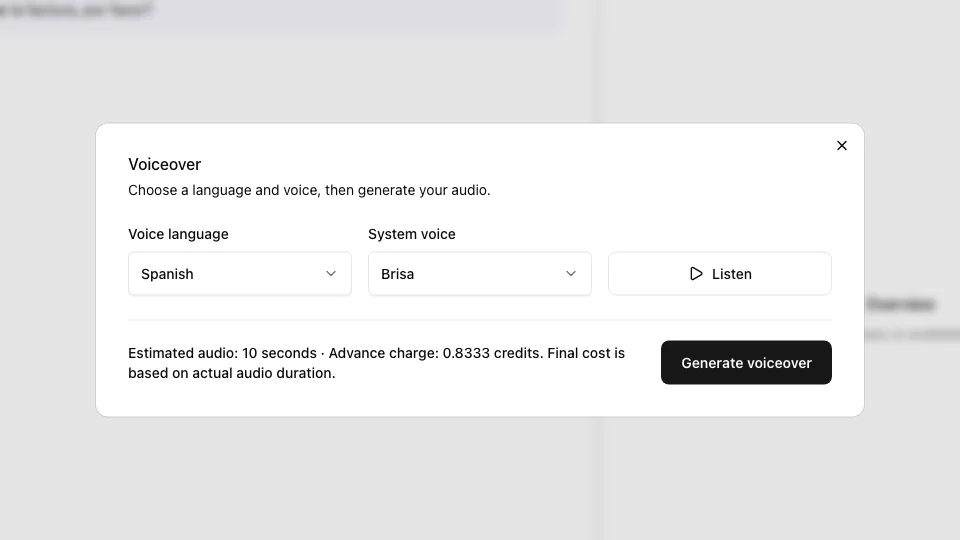
Review the cost before creating audio
Voice generation costs 5 credits per minute of newly generated audio. You see an estimate before confirming; the final cost follows the actual generated duration.
Transcription uses its own allowance or credits. New Spanish text translations cost 10 credits each. Voice generation requires a paid account with available credits.
The output is a separate Spanish audio file. It does not clone the original speaker, synchronize lip movements, or automatically replace a video’s soundtrack.
Before you translate English audio to Spanish
Will I get Spanish audio or just a translation?
This workflow starts with an English transcript and Spanish translation. After you review the text and confirm voice generation, you get a Spanish audio track to download as MP3 or WAV.
Is English to Spanish audio translation free?
Text translation can be tried free within usage limits on the text translation page. Generating Spanish speech requires a paid account and credits. The example audio on this page is free to play.
Can I use the Spanish voiceover for dubbing a video?
Yes, you can import the separate audio track into your video editor. Check its timing and length against the picture. This tool does not automatically replace the original soundtrack or synchronize lip movements.
Can I keep Spanish text and subtitles too?
Yes. Keep the English transcript and Spanish translation, and export TXT, SRT, or VTT. Subtitle timings follow the original recording, so review them if you use them with generated speech.